Showing posts with label Different Computers. Show all posts

Monday, March 14, 2011

top ten computer tools and office prank to do on April fool

April Fools, a day of friendly pranks on family, friends and business colleagues, has arrived once again.
In this day and age, Technology and the Internet rule, and the majority spend their time online browsing, emailing or shopping.
Why not try and play a joke on your friends where they spend most of their time…their computers and offices.
We gathered up a list of top pranks that are easy to implement for anyone and are actually harmless.
1. Make All the Phones in Your Office Ring Simultaneously – Make all the office phones ring at the same time using Skype. It will cost you approximately $10 for this prank but worth every penny.
2. Optical Mouse Confusion â€“ Only a few of us still use the computer mouse with a rolling ball in it, so this is an update for the optical sensor mice. Simply stick a piece of tape on the laser sensor in the bottom, color the nonstick side and watch the victim get frustrated as the mouse goes haywire.

3. Screenshot as Wallpaper Prank – this one deserves a little effort, but the reactions make it worthwhile.
Simply take a screenshot of your friend’s computer with “print screen”, hide all the icons, minimize open applications, and set the taskbar on auto hide. Watch their reactions as they attempt to select any icon or application without getting any response. You can watch the how to video here
.
4. Drive a Windows user insane - You can set any specific icon (for example, firefox, internet explorer, or outlook) to be an automatic shutoff button. Simply follow the instructions at the link, and watch as your friends continuously shut down when attempting to start a specific application.
5. Rotate the screen displayed – this one works on most Intel computers and is very easy to see if it does. Simply press ctrl + alt + arrow direction preferred (up, down, left, right). Afterwards, leave the computer and watch, for the victim cannot bring it back unless he knows the magic formula.
6. Mysterious lightbulb prank â€“ Light a bulb with your hand. May not be an extremely easy office prank, but is still fun to do on friends and family. The link shows you a video with all the directions of making this magic light bulb work only in the palm of your hand.
7. Paper cup Table Top – Load a colleague’s work desk with plenty of paper cups, fill them up with water close to the top, and then staple them all together. World’s Best Office Prank.
8. Computer Tourettes – Load a script that will randomly write swear words in a word document or outlook function. The directions for this prank can be found at the link.
9. Cracked LCD Screen saver â€“ just as the name suggests, make your friends think that their expensive screen is cracked and ruined. Easy to do, fun to watch, and completely harmless.
10. For other office prank ideas, you can check out some of these already done images
Remember, these pranks are for fun and not harm, so please…enjoy and laugh this April Fools. The last one didn’t make it in the list, but we thought it deserves to be shared

Thursday, January 6, 2011

Lenovo Presents "Y560p Laptops, K330 Desktop "

Few days ago, Lenovo launched two laptop series and one desktop series simultaneously. The laptops are Lenovo IdeaPad Y450p and Y560p; and the desktop series is Lenovo IdeaCentre K330. The laptop has a 14-inch and 15.6-inch display, respectively. They are powered by a range of processors, which include Intel Core i7 with the capacity of up to 750 GB hard drive and a memory of up to 8GB of DDR3. They are also equipped with Dolby Home Theater.

The desktop, Lenovo IdeaCentre K330, is also powered by a Core i7 CPU, up to 16GB of DDR3 SDRAM, and 4TB of HDD storage, TV turner, and Blu-ray player. Lenovo notes that both the laptops and the desktop support multimedia, heavy-duty performance, and advanced processing features. They are perfect for youth and adults. The users will enjoy a perfect experience in watching movies, listening to music, and playing games. They can store pictures and movies while enjoying enhanced application performance.

Both IdeaPad Y450p and Y560p come with 16:9 widescreen. They run Windows 7 as operating system. They are featured with faster boot up (up tp 33 percent faster), faster shutdown time (up to 50 percent faster), and easier maintenance features. Likewise, Lenovo IdeaCentre K330 is ideal for consumers who are looking forward to enjoying the ultimate computing experience. Both the laptop series and the desktop series will be available before the middle of January 2011.

Digital Storm XM 15 Gaming Laptop

Several days before the great event of CESS 2011, some breakthroughs from reputable computer and notebook manufacturers began to roll out. On December 21st 2011, a gaming laptop from Digital Storm, which it calls XM 15 gaming laptop, comes out. It is said to accommodate NVIDIA Optimus Hybrid Technology. The gaming laptop is going to start at $999. Digital Storm XM 15 gaming laptop comes equipped with a 2.4GHz Core i5-520M, 4GB of DDR3 RAM, a 320GB HDD and NVIDIA’s GT 425M.

Digital Storm promises that the customers will benefit from rich multimedia features that maintain battery life. It is an ideal option for those who are looking for energy efficient gaming laptop that is capable of performing heavy weight gaming activities and multimedia applications. However, it is a lightweight laptop, combined with built-in light speed eSATA and USB3.0 transfer ports and HDMI and VGA outputs. Watching HD movies and surfing the web are comparably convenient using the laptop.

The support of Hybrid Technology from NVIDIA Optimus allows the users to switch the operations without obstructing the running operation. They can smoothly switch between the two graphic processors by increasing or decreasing the performance as needed. This is the cornerstone for intensive battery use.

AirMediaPlayer Users of Windows PCs

Few days ago, Apple noted that its AirPlay media player is working on Windows PCs. Airplay allows the owners of iOS 4.2 to stream media to the Macs or Linux devices. Now, it is the time for AirMediaPlayer to come to Windows PC. It means that the users of Windows PCs have the same advantage to enjoy the same convenience. The player works effectively on PCs that run Windows XP, Windows Vista, Windows 7, and Microsoft.NET Framework 3.5 SPI.

Devices that support Hello for Windows (included iTunes or Bonjour for Windows) and QuickTime can benefit from the device. The advantage of the player is that, after installed, it allows the users of iPad, iPhone, or iPod to stream video or music directly to a Windows PC – a convenience that has been enjoyed by Mac users. More interestingly, sending the video or music from the iPhone does not require the users to connect the device to the specified PCs.

AirMediaPlayer for Windows PCs has been available now for free download. Actually, the availability of the player is a little bit surprising since it was still in the development phase few days before, even though the coming of the player had been predicted for long. It is developed by Apostolos Georgiadis that designs the tool to stream the media via AirPlay. It is also built with backward compatibility that it works on any device equipped by AirPlay.

Configurable N67 Laptop In Advance of CES 2011

CES 2011 is few days away. However, Santech is not patient enough to wait for the moment. It goes in advance by releasing the new N67 laptop. Santech N67 laptop is said to host Sandy Bridge CPUs, which will officially be released by Intel at the aforementioned moment. Santech makes advantage of Core i7-2630 (quad-core, 2GHz) processor. The laptop also hosts up to 16GB of DDR3 RAM, up to 750GB of magnetic storage or 160GB of the solid state, and USB3.0 ports.

The 15.6-incher Santech N67 laptop manages a resolution of 1366 x 768 or 1920 x 1080 depending on your taste and budget. Yes, the laptop is available in two models. The laptop will be available starting from January 27th with a price range of €1,200 ($1,577) and €3,000 ($3,943). Santech offers the customers with a chance of configuring the laptop by offering an impressive list of hardware to customize the notebook based on their need. Santech also did the same when it released the N56 series.

Therefore, in addition to choosing the laptop powered by Core i7-2630 (quad-core, 2GHz) processor, they can also choose one powered by 2.5GHz for the Core i7-2920XM, i7-2720QM (2.2GHz), or i7-2820QM (2.3GHz) processors. Santech also enables the customers to choose an Intel Wi-Fi / WiMAX combo network card or a 3G UMTS/HSDPA modem. Santech N67 laptop comes with good webcam resolution and inbuilt 10/100 MB Ethernet LAN Port.

Wednesday, December 15, 2010

B-membrane: - Concept Computer

B-membrane PC


The B-membrane based laptop/desktop is a new abstraction sketch By Korean designer Won-Seok Lee. It is a latest example of modernization of technology. It has polished like a unidirectional projector which contains windows facing in any side of the surface.
B-membrane PC

There is no deficiency of any individual computer system concepts where as the development of this has replace the call for immense desktops computers. The hybrid concept is sign of revolution in technology and put across to mark a revolution. Additional fragments contain membrane keyboard that come outs when needed, optical drive has associated with it. There is also an ultimate and exclusive feature of its accessibility as a source of ambient light enlightening the surroundings’ when not in use as a PC.
B-membrane PC

B-membrane PC

B-membrane PC

Medion NetPad Mobile Computers


Buzz It
In the series of the concept laptop, Medion is going to launch a new concept laptop that is NetPad mobile computer for future generation. This main display of that laptop is comprises two info bar touch strips that provide great convenience of spotting new email arrivals, bringing up photos and changing songs to the user.

Medion NetPad mobile computer

Medion AG that is a very popular German consumer electronics company. It operates ithe many areas of whole world link Europe, the United States, and the Asia-Pacific region. The main products of the Medion AG company are computers, TVs, toasters, fitness equipment fitness equipment refrigerators. The Medion AG company is becoming popular in Europian market.

Medion NetPad mobile computer

Features of Medion NetPad mobile computer -

The Medion NetPad mobile laptop has a retractable razor-thin keyboard that allows the user to keep it away when not in use, and to this will make watching movies more exciting. Medion NetPad will come with the windows 7 operating system and software.

Medion NetPad mobile computer

Medion NetPad mobile laptop has a HD screen that has a very good resolution and clear picture. This Laptop has a media streamer that offers hi-fi sound when that provide you good
sound quality.

Medion NetPad mobile computer

Medion NetPad mobile laptop has carbon fiber lid body that protect it from harms and it is easy to transport.This laptop is also embedded with a GPS device.

Medion NetPad mobile computer

New E Ball Concept Pc modern technology

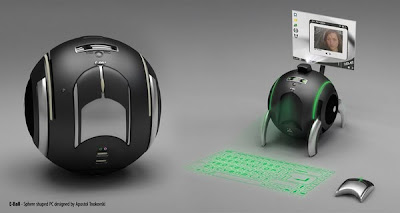
new concept of pc is coming now that is E-Ball Concept pc. The E-Ball concept pc is a sphere shaped computer which is the smallest design among all the laptops and desktops. This computer has all the feature link a traditional computer elements like keyboard or, mouse., dvd, large screen display.


New E Ball Concept Pc

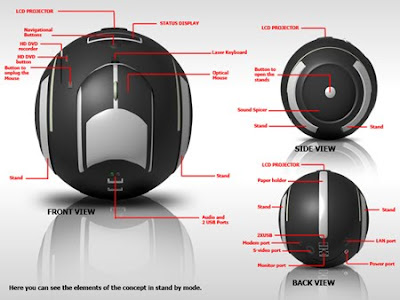
E Ball is designed that pc is be placed on two stands, opens by pressing and holding the two buttons located on each side of the E-Ball pc , this pc is the latest concept technology.

New E Ball Concept Pc

Features of the E-Ball Pc concept -

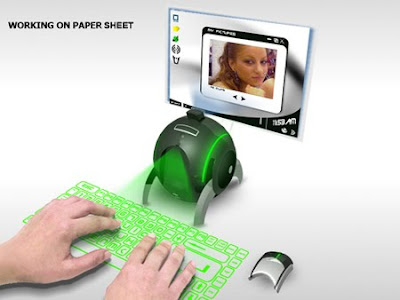
E-Ball concept pc has a laser keyboard that is fully a concept keyboard that is visible when the pc is in working and it is also have a optical wireless mouse which is work very smoothly in any direction.

New E Ball Concept Pc

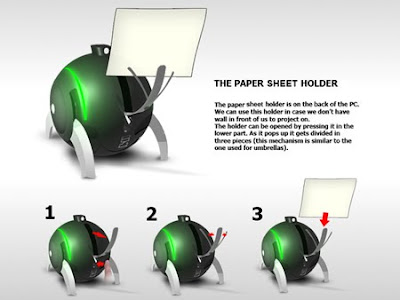
E Ball concept pc don't have any external display unit,it has a button when you press this button a projector will pop and it focus the computer screen on the wall which can be adjusted with navigation keys. If there is no wall then it has a paper sheet holder that divides into three pieces like an umbrella just after popping up,and it will show desktop on the paper sheet.

New E Ball Concept Pc

The software interface of E-Ball concept pc is highly stylized with icons that can be remembered easily that support all type of windows operating system. E-Ball concept pc is work very easy while you are making video presentations, listening music watching large screen movies, and chatting on the net.

New E Ball Concept Pc
You might also like:

Tuesday, March 2, 2010

Wacom Cintiq 21UX: Touch a Screen


The flashiest upgrade for any computer is a big, beautiful LCD monitor. It’s something everyone will notice. But not everyone will catch on that the Wacom Cintiq is so much more than just a 21.3-inch looker-at least, not until they see that cordless stylus next to it. Then you can reveal the truth: It’s, an interactive, pressure-sensitive (to 1,024 levels), pen-driven display that you need for your art.